Installing applications on the Mac
23 Dec 2008 - Installera, mac


Seriously, Apple. This sucks. What we need is an App Stor for the Mac, that handles all of this.
EIther way, the problem is that you download a DMG file, you double click the DMG file (or it is auto-mounted) and then - hopefully - the developer has provided a background image and an alias to the /Applications folder, saying that you should drag the application from the the DMG to the folder inside the same window, which somehow means that it will install on your hard drive. That is, if you even knew the difference.
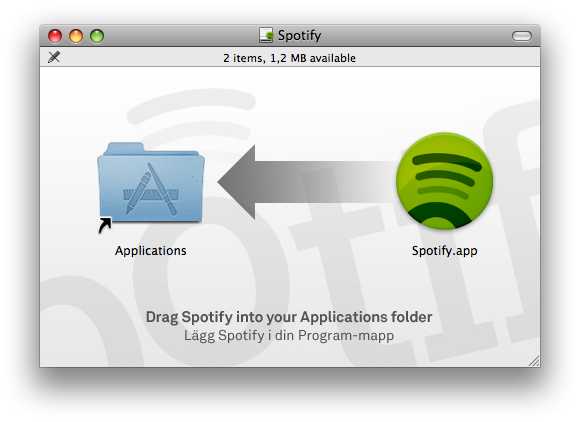
Then, you need to store a short cut of this new application in the dock, but not use the application icon that is right in front of you - i.e. in the DMG. No, you need to unmount the DMG volume and then find the application in the applications folder and drag that one to the Dock.
Are you an idiot if you don't know what a DMG is? Or what a mounted volume versus your hard drive is? Or aliases versus actual files? Of course not. fact is that the Mac is supposed to be easy to use and this is a counter-argument to that. This is just stupid. With it's simple drag'n'drop install, why aren't DMG volumes like burn folders, for instance? When mounting the DMG, the folder will popup, with the button "Install" instead of "Burn".
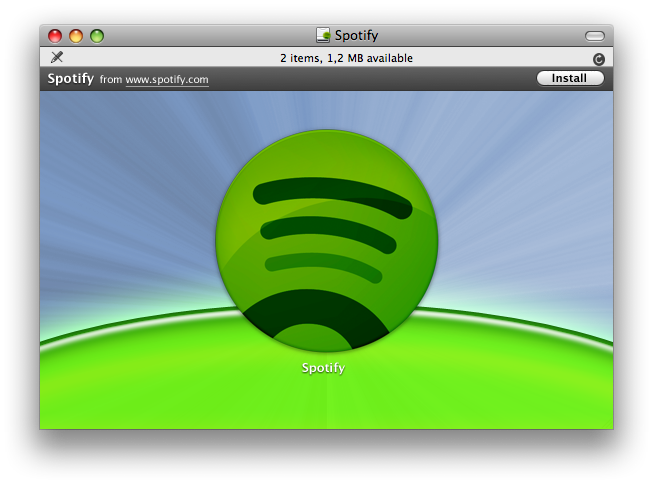
This is what it should look like instead. The window has - just like before - a background image provided by the developer. The dark bar is shown automatically with the name of the application and where it was downloaded from (OSX already keeps track of this) and a button to install. What file is the correct application file is either determined by it being the only application bundle in the disk image, or by a small hidden plist file that only contains a reference to what file it is. Nothing more. If you click the button, that file is copied to /Applications.
This is not an installer. The developer can not execute anything. It's an auto-detection of an application and an offer to copy it to /Applications. That is all that can be done here.
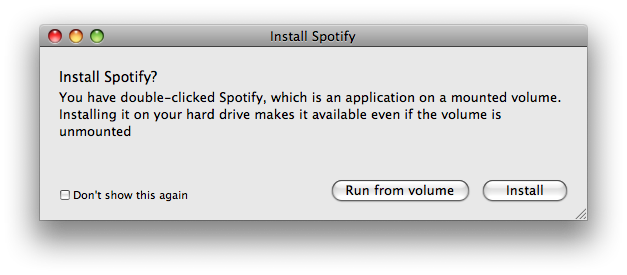
If you double-click the file icon, this is shown which amounts to pretty much the same thing.
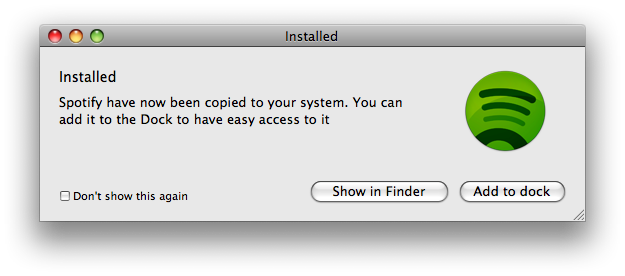
When you're done (either by double-clicking, dragging it to copy or by using the install button) this shows up, asking if you want to add it to the dock as well.
Mer i Webblog




Nyckelord: Installera or mac